


Fourth Grade Learning Games
4.01.91K Reviews
App Specs
- Version
- 7.3
- Updated On
- License
- Free
- Downloads
- 1,000,000+
- Developer
- RosiMosi LLC
- Categories
- Educational
- Platform
- Android
Screenshots

 Analysis by AppCompare
When I stumbled upon Fourth Grade Learning Games, I was on the lookout for something to keep my niece engaged while also sneaking in a bit of learning. Trust me, trying to find the right balance between fun and educational can be a wild goose chase. But this app caught my eye, and I decided to give it a whirl. Let me walk you through my experience.
What stands out to me is the simple promise of a collection of short learning activities in one place. Rather than replacing a school lesson or a parent’s help, the game can give a child a lower-pressure way to revisit familiar fourth-grade topics. I’d treat it as practice and variety, not as a complete curriculum: a game can make a concept more inviting, but it cannot tell you by itself whether a child has mastered it.
That distinction matters when choosing an educational app. If a child is reluctant to start homework, a quick activity can be an easier first step than a worksheet. If they need a careful explanation of a new idea, though, a teacher, textbook, or focused lesson app may do a better job. I see this game as most useful in the space between those two situations: keeping skills active without making every bit of practice feel like formal schoolwork.
Diving into the App
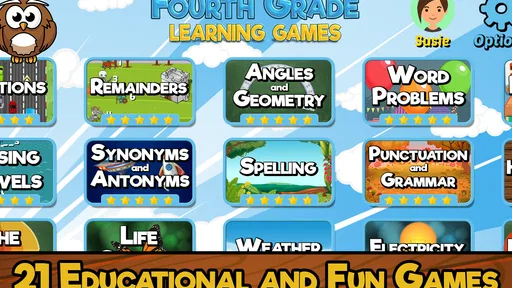
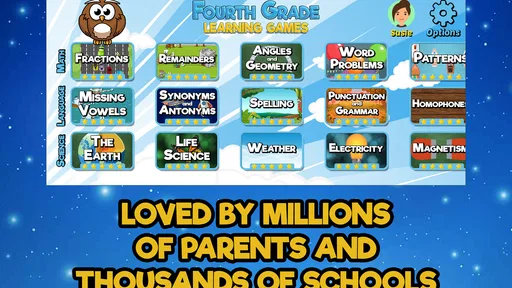
Upon launching Fourth Grade Learning Games, you’re greeted with a vibrant interface that’s both welcoming and easy to navigate. Kids aren’t fans of anything too complicated, so this is a big win right off the bat. The app offers a variety of games covering topics like math, language arts, science, and even social studies. It’s like having a mini classroom in your pocket.
RosiMosi LLC makes this educational game for children, and its wide subject mix is the main practical draw. The collection includes 21 games, so a parent can offer a choice of activity instead of repeatedly steering a child toward the same exercise. That does not mean every child will enjoy every subject equally. I’d let the child pick between a couple of options, then use that choice to guide a short session rather than expecting them to work through everything in order.
A useful way to make the variety work is to connect play to the school day. If a child has just practiced fractions, for example, a math activity can be a low-stakes way to revisit the topic later. If they have been reading or writing, the language games offer a different kind of practice. I would not use the app to diagnose a learning gap, but a child’s reaction can give a parent a clue about which topics feel comfortable and which ones may need patient help away from the screen.
For a realistic routine, imagine a child arriving home tired after school and resisting another worksheet. I’d offer one game as a brief transition before dinner, then ask what they found easy or tricky. That conversation is more useful than simply counting time spent in the app: it helps connect the activity to what they are learning and gives an adult a chance to notice confusion. The game can open the door, while a parent or teacher supplies the explanation when a question needs more than a hint.
Worth Reading Before You Choose

EA SPORTS FC Mobile 26 Is a Bigger Football Game, but It Takes Time

Flipboard Shows What News Apps Must Do Beyond the Feed

Switching to Android Auto Means Rethinking Your Driving Routine

Google Calendar Makes a Crowded Week Easier to Manage

Ludo King Makes the Most of the Minutes Between Plans

Baby Panda World Brings Quick Play to Modern Phones, but Its Game Library Feels Busy
Math Made Fun
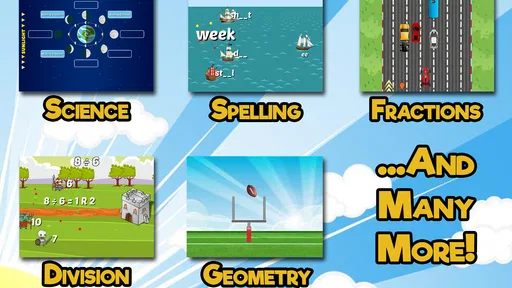
Math can be a bit of a monster, right? But this app turns it into a game with challenges that help kids practice multiplication, division, and fractions. The interactive quizzes make sure they’re not just staring at numbers but actually engaging with them. I tried it myself, and even I felt a bit smarter after a round or two!
For families, the advantage of quiz-style practice is that it can make repetition feel less like drilling. I’d use it after a lesson or during a short break, not as the only way a child encounters multiplication, division, or fractions. When an answer is wrong, the important follow-up is to ask how the child was thinking; getting another try can be encouraging, but understanding the method is what helps the skill transfer to homework.
Language Arts Adventure
Now, onto language arts. The app cleverly incorporates vocabulary building and grammar through word puzzles and sentence construction games. It’s like a digital Scrabble session for kids, and it’s just as addictive. Watching my niece piece together sentences with newfound words was like witnessing a light bulb moment. Pretty awesome, if you ask me!
This kind of play is especially handy when a child needs a change from number work. Word-based challenges invite them to think about how language fits together, while an adult can extend the activity by asking the child to use a new word in a sentence of their own. That small offline step is worth doing: it turns a correct answer on the screen into a chance to practice expressing an idea without relying on the game’s prompts.
Exploring Science and Social Studies
Science and social studies are often subjects that kids find a bit dry, but not here. The app turns these topics into interactive stories and quizzes that keep the kids hooked. They’re learning about planets, ecosystems, and even historical figures without even realizing it. It’s stealth education at its finest.
I’d think of these activities as a spark for curiosity rather than a substitute for deeper study. If a child brings up a planet, ecosystem, or historical figure afterward, that is a natural moment to look at a library book, talk through a class topic, or ask what they remember. This is one area where the game’s breadth can help a family find an appealing starting point, while a dedicated science or history resource will usually be a better choice for sustained, detailed learning.
User Experience and Design
The design is colorful and engaging without being overwhelming. It's like they knew exactly how much pizzazz to sprinkle in without going overboard. The navigation is intuitive, so kids can easily find their way around. Plus, the rewards system keeps them motivated to keep playing and, more importantly, keep learning.
In everyday use, I would keep the choice of activity simple. A child who is asked to browse a whole collection can spend more time deciding than learning; offering two choices makes it easier to get started while still giving them some control. Rewards can help with that first nudge, but I would not make them the reason to continue once the child is tired. A short, positive session is more valuable than pushing through just to collect another reward.
That is also where this game differs from the usual alternatives. A worksheet is more direct and easier to align with a specific assignment, while a full online lesson can explain a topic step by step. This app’s stronger role is varied, game-based practice across several school subjects. I’d choose it for an accessible change of pace, but reach for a targeted lesson or the teacher’s materials when a child needs a thorough explanation or curriculum-specific preparation.
One thing I’d love to highlight is the app’s feedback system. It’s encouraging and positive, which is crucial for kids. They get hints when they’re stuck and praise when they do well. It’s a confidence booster wrapped up in a game, and who doesn’t love that?
Hints are most useful when they help a child keep trying rather than immediately handing the answer to an adult. I’d give them a moment to work through a challenge before stepping in, then ask them to explain what changed after using a hint. That makes the feedback part of learning instead of just a route to the next screen. Still, praise and hints cannot replace a person noticing when a child is repeatedly stuck or frustrated.
Parental Controls and Peace of Mind
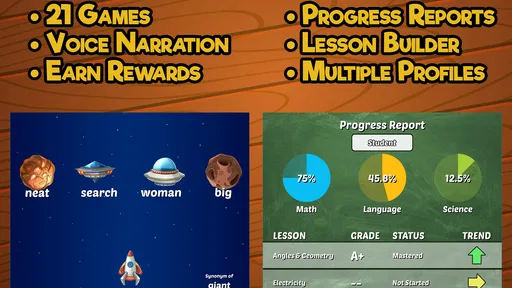
For the parents out there, you’ll be happy to know the app includes parental controls. You can monitor progress and even set limits on screen time. It’s like having an extra set of eyes ensuring that the learning doesn’t turn into endless gaming. This feature made me breathe a little easier, knowing my niece was in a safe digital environment.
Since children use educational games differently, I’d check the controls with the child’s routine in mind rather than assuming one setting fits every family. A parent may want to make a short practice period part of homework time, while another may allow a little play during travel or a quiet moment at home. Setting expectations before handing over the device can prevent the familiar argument about stopping once a child is absorbed.
The app is free to start, with in-app purchases priced from $4.99 to $39.99 per item. I’d make that part of the parent’s setup conversation: check what is available in the version being used and decide in advance whether purchases are appropriate. The game is rated Everyone, but that age label does not mean every fourth grader will find each activity equally suitable or challenging. A quick look together is still sensible, especially for a younger child or one who needs more tailored material.
The app also doesn’t bombard you with ads or unnecessary distractions, which is a huge relief. It’s refreshing to see an app that’s genuinely focused on education rather than upselling.
In deciding whether to install it, I’d also consider the child’s device and expectations. It is available for devices running version 8.0 or later, and the current version is 7.3. The game has a 4.0 average from around 7,900 ratings, with about 1,900 written reviews and over one million installs. Those figures suggest that many families have tried it, but they do not tell me whether it will match one particular child’s interests, so I’d judge it by a short trial with the subjects that child actually enjoys.
The biggest trade-off is breadth versus depth. A mix of school subjects makes it easier to switch activities and find a willing starting point, but a child who needs focused instruction in one difficult area may be better served by a specialist tool or direct help from an adult. Likewise, children who dislike quizzes and game rewards may prefer reading, hands-on projects, or ordinary practice. I would skip this as a primary learning solution if the goal is a structured course, detailed progress planning, or individualized teaching.
Final Thoughts
In the end, Fourth Grade Learning Games manages to strike a perfect balance between fun and education. It’s engaging, cleverly designed, and packed with content that’s educational without being boring. If you’re looking to keep your kids entertained while also giving them a leg up in school, this app is a solid choice. Give it a try, and you might just find yourself learning something new too!
My recommendation is for parents who want a flexible way to add a little practice to ordinary family life, especially when a child responds better to choosing an activity than being handed another worksheet. I’d start with a subject the child already likes, keep the first session brief, and ask afterward what they learned or found confusing. That approach gives the game a useful role without expecting it to do a teacher’s job.
If the child is engaged, the range of activities can make it a handy option to revisit; if they need a more serious explanation, or if screen-based quizzes simply do not suit them, another resource will be a better fit. For me, that is the honest appeal: an approachable educational game from RosiMosi LLC that can make practice feel lighter, provided an adult keeps its limits and purpose in view.
Pros
- Engaging
- colorful graphics keep kids interested.
- Wide variety of subjects covered effectively.
- User-friendly interface for young learners.
- Offline access available for uninterrupted play.
- Regular updates with new content and features.
Cons
- Some content requires in-app purchases.
- Occasional ads can disrupt learning flow.
- Limited parental controls for monitoring.
- Might be too basic for advanced learners.
- Requires a stable internet for updates.
FAQs for Fourth Grade Learning Games
What subjects are covered in Fourth Grade Learning Games?
Fourth Grade Learning Games offers a comprehensive range of subjects including math, science, language arts, and social studies. The app is designed to enhance learning with interactive activities that align with educational standards. This ensures that children are not only entertained but also learning crucial fourth-grade topics in a fun and engaging way.
Is Fourth Grade Learning Games suitable for all learning styles?
Yes, Fourth Grade Learning Games caters to various learning styles by incorporating visual, auditory, and kinesthetic elements. Interactive quizzes, engaging animations, and hands-on activities help ensure that children with different learning preferences can benefit from the app. This diversity in teaching methods aids in better understanding and retention of information.
Does the app offer progress tracking for parents and teachers?
Absolutely, Fourth Grade Learning Games includes a progress tracking feature that allows parents and teachers to monitor a child’s development. The app provides detailed reports showcasing strengths and areas for improvement, helping adults tailor support and intervention as needed to enhance the child's educational journey.
Are there in-app purchases or advertisements in Fourth Grade Learning Games?
The app is designed to be a safe and distraction-free environment for children. While there may be some in-app purchases to unlock additional content, there are no intrusive advertisements. This ensures that children can focus solely on learning without being interrupted by ads or unrelated content.
Can Fourth Grade Learning Games be used offline?
Yes, Fourth Grade Learning Games can be used offline, making it a convenient option for learning on the go. Once the app is downloaded, most of the content is accessible without an internet connection, allowing children to continue learning during travel or in areas with limited connectivity.


